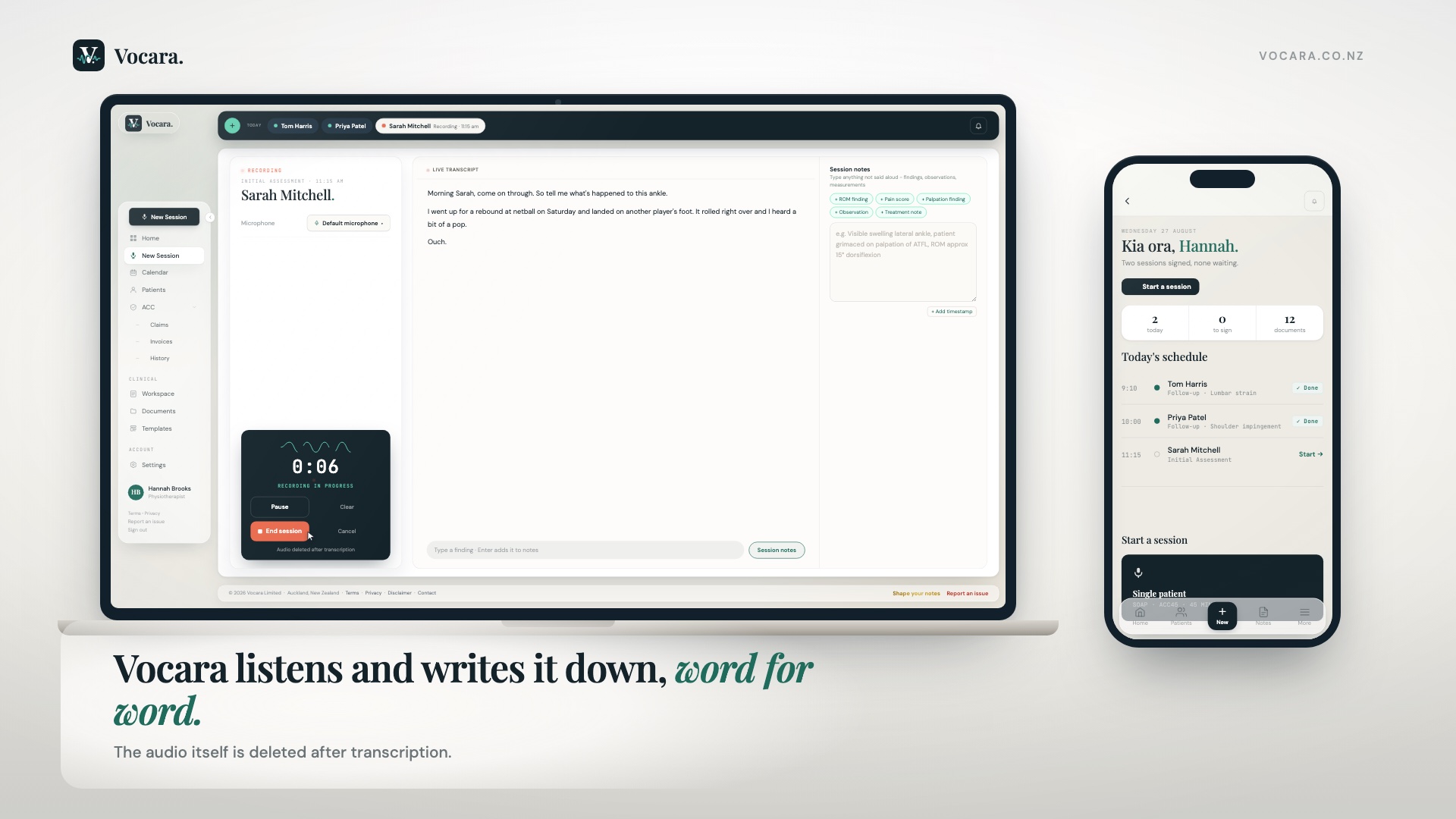
Vocara listens to your session and writes a fully structured, ACC-ready clinical note in 15 seconds - and drafts the ACC paperwork stacked on top. Hours back, every month.
Any AI scribe can shorten your notes. Only Vocara touches the part of NZ practice nobody else understands: the ACC paperwork stacked on top.
Every AI scribe does this
SOAP / clinical notesSaves ~10 min / patient
Roughly 6 to 7 hrs a week back at 40 patients. Table stakes in 2026.
Vocara does all of this
SOAP / clinical notesSaves ~10 min / patient
and the part only Vocara does
ACC32 extension requestsSaves ~20 min / request
ACC45 lodgement + READ codesSaves 5-10 min / claim
Referral letters + rehab plansSaves 10-15 min / document
A physio seeing 40 patients a week gets back roughly~30 hrs / month
Estimates based on the time these documents typically take by hand. Individual results vary.
Every screen is the real app
Watch one appointment become a signed note.
Start to finish in two and a half minutes: the note writing itself, the ACC45 lodged, the ACC32 drafted and sent to ACC, and a referral on your clinic letterhead. Built from the app's own screens, with the waiting taken out.
This is the world Vocara speaks natively. A working reference for NZ practitioners - free, whether you sign up or not.
Common injuries → READ codes
Sprain of cruciate ligament, kneeS83.5
Sprain of ankleS93.4
Rotator cuff strain, shoulderS46.0
Low back strain, lumbarS39.7
Lateral epicondylitis, elbowM77.1
Vocara searches the full code table for you1,900+ codes
The forms, in plain English
ACC45Lodges a new injury claim. Needs the READ code, mechanism of injury and diagnosis. Vocara drafts it from the session.
ACC32Requests more funded sessions when the allocation runs out. The justification is the hard part - Vocara writes it from the clinical record and submits it to ACC, all inside Vocara.
Session allocationsEvery claim comes with a funded session count. Vocara tracks it and warns you before you hit zero.
Invoices, receipts and history
InvoicingInvoice ACC without leaving the note. Off until a clinic owner turns it on, and Vocara checks ACC's own records first so a visit is never billed twice.
ReceiptsWhat ACC has paid, the status of each invoice, and every invoice ACC holds against your claims, from any software. ACC pays your practice directly.
HistoryEvery submission Vocara has made on your behalf, with exactly what ACC sent back, filterable by claim, patient or type.
Your discipline → ACC provider type
Physiotherapy81
Acupuncture / TCM79
Osteopathy78
Chiropractic86
Podiatry85
Hand Therapy58
Plus OT, speech, psychology, counselling and psychotherapy+5
How it works
Five steps. No new habits.
Vocara fits the session you already run - it just removes the part you dread.
01
Record
Run your session normally. Vocara listens in the background - no buttons to press, no prompts, no disruption to your therapeutic relationship.
02
Transcribe
AssemblyAI Medical Mode captures clinical vocabulary with high accuracy. Clinician and patient voices are automatically labelled.
03
Generate
Claude AI generates a fully structured note - SOAP, DAP, BIRP, your custom format - with all required ACC fields populated from what was said.
04
Review
Edit with AI assistance, add typed observations from the session, confirm contextual snippets the AI flagged as clinically relevant. You decide.
05
Sign & Export
One tap sign-off. Push directly to Cliniko or Nookal, download PDF, or generate a referral letter - all without leaving Vocara.
“Vocara helps me remember everything, to a degree of detail that no other AI writer has permitted.”
I value connecting with my patients, listening carefully, speaking naturally and going deep into their experiences, concerns and goals.
Vocara allows me to do this without the constant interruptions of needing to type notes, without taking my eyes off my patient.
I value detailed notes, recording the nuances of subjective and assessment findings, and the patient's own responses and insights as we progress.
Vocara does this really well.
HR
Helen Robartes
BSc Physio, MSc Veterinary Physio · MPNZ · Nelson
Built around your ACC workflow.Not bolted on.
Every other tool treats ACC as a checkbox. Vocara was designed around the ACC45, session allocations, and the codes you actually use - because it was built by someone who watched a clinic drown in them.
ACC45 code suggestion
Describe the injury in plain language. Vocara suggests the correct READ code.
S83.5 - Sprain of cruciate ligament ✓
Session allocation tracking
Vocara counts every funded session and warns you before you run out.
0 of 16 sessions used50%
ACC32 justification
Out of sessions? Vocara drafts and submits the ACC32 extension request to ACC, without leaving the app.
Sessions remaining: 2
Invoicing and payments
Invoice ACC without leaving the note, then see what ACC has paid. Off until you switch it on, and it checks ACC's own records first so a visit is never billed twice.
Invoice 4412 · accepted$48.60 paid
Make it yours
Your notes should sound like you wrote them.
Generic AI notes read like generic AI notes. Vocara is built to disappear into your own documentation, not replace it with someone else's.
Custom templates
Build your own note format section by section, or start from SOAP, DAP or BIRP and bend it to your clinic.
It learns how you write
Every edit you make teaches Vocara your phrasing, your headings, your conventions. The notes drift toward your voice, not away from it.
Your letterhead, every export
Set your clinic branding once and every note, letter and ACC document goes out under your name and logo, not ours.
A Kiwi team, one email
Something still not sitting right? Email us and it gets tuned for you. You reach the people who build Vocara, not a ticket queue, and you hear back the same day.
Works with the tools you already use.
Cliniko
Search patients, pull appointment details, and push signed notes directly to treatment records - all without leaving Vocara.
Nookal
Full patient and appointment sync. Notes pushed directly to Nookal patient records on sign-off.
Your data stays in your practice. Notes are never used to train models.
Where Vocara is different
Any scribe writes notes. One of them knows NZ.
Capability
Vocara
Overseas AI scribes
PMS built-in scribes
What every good scribe does
Ambient recording, structured note in seconds
✓
✓
✓
SOAP, DAP, BIRP and custom formats
✓
✓
✓
Works on phone, tablet and desktop
✓
✓
✓
You edit and sign before anything is final
✓
✓
✓
Where the others are strong
Coverage beyond allied health (GP, hospital, psych)
-
✓
✓
Sits natively inside one practice-management system
~
-
✓
Writes back into Cliniko and Nookal
✓
✓
✓
Where NZ practice actually happens
Understands what an ACC45 is
✓
-
~
ACC45 lodgement from inside the note
✓
-
-
ACC32 drafted and submitted inside the app
✓
-
-
Invoice ACC from inside the note
✓
-
~
Cover checked the moment you record a claim
✓
-
-
Diagnosis corrections sent straight to ACC
✓
-
-
Funded session allocation tracked and warned
✓
-
~
ACC provider type codes for your discipline
✓
-
~
Equine and canine assessment formats
✓
-
-
Built and supported in New Zealand
✓
-
~
✓ built in · ~ limited or partial · - not available. Judged on NZ and ACC practice specifically. Vocara is the one built for how NZ allied health actually bills: monthly, no lock-in, cancel any time.
Who's behind this
Made locally by a Kiwi team. Close enough to actually listen.
Vocara isn't a venture-backed product squad in another timezone. It's a Kiwi team in Auckland, building for the practices we know, after watching one drown in ACC paperwork that no overseas tool was ever going to fix.
That means when you email, you reach the people who build Vocara. Feature requests don't vanish into a backlog. They go into next week's update.
“I value working with people who are reliable and keen, solution-focused, and just good people. That is the team at Vocara.”
Helen Robartes · BSc Physio, MSc Veterinary Physio · Nelson
Want your notes shaped to how you actually write?
Every clinician documents differently. Email us and we'll tune Vocara's output to your style: your headings, your phrasing, your discipline's conventions. Included, not an add-on.
Animal physiotherapy is not human physiotherapy with the words swapped. Vocara ships four dedicated veterinary formats and the anatomy vocabulary to go with them, built as a product of its own.
Equine
Initial Assessment and Follow-up formats written for equine work. Vocara knows the poll, withers, sacroiliac, stifle, hock, fetlock, pastern and coffin joint, so dictated findings land in the right region instead of being guessed at.
Canine
A Canine Functional Assessment covering observation, gait and regional manual assessment. Body condition score, conscious proprioception, the knuckle test, deep pain sensation, ambulatory versus non-ambulatory: all understood, not transcribed phonetically.
Nothing human in the way
Vet mode drops claim numbers and provider codes entirely. You get species and your own case reference instead, so an animal practice never has to work around forms built for human clinics.
Built for the real session length
An equine assessment can run past 90 minutes. Vocara records and writes the note for sessions that long, because the practitioner who found every one of those limits is an equine and veterinary physio.
Veterinary SOAP is there too, for canine and other animal physiotherapy. Every format is a starting point you can edit into your own.
Straight answers
The questions people actually ask.
Does Vocara lodge the ACC45 with ACC?
Yes. The ACC45 is drafted from your signed note, you review every field and confirm the attestation, and it is lodged with ACC from inside Vocara. The claim number comes back into the note and the patient's record. Vocara holds ACC production access, granted after ACC's own compliance verification, and every submission is made under your practice's ACC identity, never Vocara's. How ACC lodgement works →
Can Vocara submit ACC32 treatment extension requests?
Yes. The ACC32 justification is drafted from the clinical record, you review and edit it, and it is submitted to ACC from inside Vocara, filed against the claim with a receipt of exactly what was sent and what ACC replied.
Does anything get sent to ACC automatically?
No. Nothing reaches ACC without the treating practitioner reviewing it and pressing send, every time. Vocara also never writes your causation judgement: the link between accident and injury is your clinical opinion, entered by you.
Does the AI ever add things that were not said?
No. Notes are transcript-only: if it was not said or written in the session, it is not in the note. If you prefer short notes, a Key points style writes every section as sharp bullet facts instead of prose, under any note format including your own templates.
Does Vocara work with Cliniko and Nookal?
Yes. Patients and appointments sync in, and signed notes are filed back into the PMS against the right patient and case.
What happens to the audio?
Audio is deleted immediately after transcription. Your notes stay with your practice, aligned with the NZ Privacy Act 2020, with no advertising trackers.
Who builds Vocara?
A Kiwi team in Auckland, New Zealand, building specifically for NZ allied health: physiotherapy, chiropractic, osteopathy, podiatry, acupuncture and occupational therapy, plus equine and canine work. Billing is monthly with no lock-in. Pricing → · How it compares to other scribes →
Audio deleted immediatelyNotes stay with your practiceNZ Privacy Act 2020 compliantNo advertising trackers